
Retrospective Tools
Miro logo
Whiteboard· Amsterdam, NL· Founded 2011

Miro

Innovation Workspace where retros happen on the same canvas as discovery and planning

Overall score
7.2

Overview

Miro is the dominant online whiteboard, now sold as an AI Innovation Workspace. It pairs an infinite canvas with a 7,000+ template library (300+ retro formats among them), AI clustering by sentiment/keyword/author, Engage live polls and word clouds (included with Business since June 2026), Blueprints for reusable multi-board workflows, real-time and async collaboration, and a 250+ app marketplace with first-party two-way card sync to Jira, Azure DevOps, Asana, Linear and ClickUp. An official MCP server runs on every plan under per-tier daily call quotas.

Best for: Large product, design and engineering orgs that already run discovery, planning and retros on one canvas and want AI clustering plus deep Jira/Azure DevOps/Asana sync.
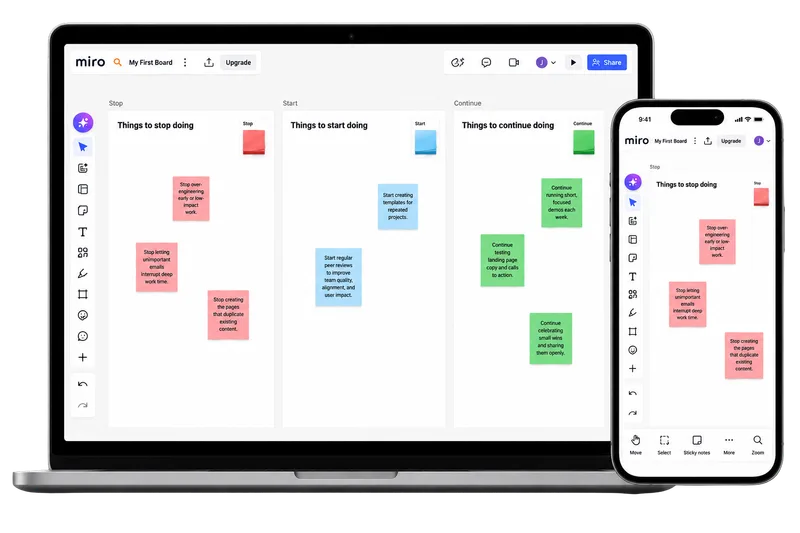
Miro retrospective board shown on desktop and mobile

How Miro describes itself

Miro sells itself as the AI Innovation Workspace — one canvas covering the whole arc from brainstorm to shipped prototype, aimed at product, design and engineering leadership at mid-market and enterprise companies tired of stitching point tools together.

"Human collaboration at the speed of AI — where your team and AI think, plan, and build together, in a workspace that works the way you do."

The homepage has retired the spring's Canvas 26 waitlist theatre for six shipped pillars: AI, Intelligent Canvas, Formats, Blueprints, Enterprise Security & Scale, Integrations. Retrospectives are one workshop among 7,000 templates — pitched on the agile landing page, never the homepage.

Our take

Miro is the best general-purpose canvas on the market and a credible retro venue if your team already lives there. AI clustering by sentiment, tag, author and keyword genuinely saves a facilitator ten minutes on a 60-sticky board; private mode hides input until reveal; first-party two-way sync to Jira, Azure DevOps, Asana, Linear and ClickUp turns a sticky into tracked work in one click. Engage — live polls, word clouds, scales, QR-code joining with no account — has been included with Business since late June and remains the most retro-useful thing Miro has shipped. Security is first-class and independently attested: SOC 2 Type II, ISO 27001:2022, ISO 42001, and US/EU/AU/Japan residency.

The gaps are structural, not fixable with a better template. No recurring retros, no action carryover, no health-check trend line, no cross-team rollup. Blueprints let you save a retro Space and re-run it, but that is reuse, not cadence. Nothing shipped since May moved the retro needle.

Excellent if Miro is already your platform. Overkill if it isn't.

Score breakdown

Ease of Use7.0
Retro Toolkit5.0
Value5.0
Fun Factor7.5
AI & Insights7.0
Integrations9.0
Open Platform7.5
Enterprise-grade9.5

Pros

  • + Enormous template library (7,000+ board templates, 300+ retro formats) plus the Miroverse community gallery
  • + AI clustering groups sticky notes by colour, tag, author, keyword and sentiment — real time saved on a 60-sticky board
  • + First-party two-way card sync to Jira, Azure DevOps, Asana, Linear and ClickUp, so a sticky becomes tracked work in one click
  • + Engage activities — live polls, word clouds, scales, ranking — are included with Business; participants join by QR code with no Miro account
  • + Enterprise-grade SSO, SCIM, audit logs, SOC 2 Type II, ISO 27001:2022, ISO 42001 and US/EU/AU/Japan data residency; official MCP server on every plan

Cons

  • − Per-seat pricing: 24 people cost $192/mo on Starter billed annually ($240 monthly). Business — SSO, editing guests, Engage, Azure DevOps and Linear sync, full Sidekicks — is $480/mo annually ($600 monthly), and AI is credit-metered on every tier
  • − Recent G2 reviewers' loudest complaint is billing, not the canvas: guests converted to paid licences and prorated mid-cycle seat charges
  • − No health checks, mood tracking or longitudinal team pulse; Engage Scales reads the room once, it doesn't draw a trend line
  • − No recurring retros, scheduling, action carryover, cross-team rollup or action dashboard — facilitators rebuild structure each sprint, and actions only persist as Jira/Azure DevOps/Linear cards
  • − SCIM, audit logs, domain control and US/Australia/Japan data residency are Enterprise-only (EU hosting is the default on every plan), and Enterprise starts at 30 seats

Features

Retrospectives

TemplatesCustom templatesAnonymous input· Votes are always anonymous; private mode's 'Make names anonymous' option strips sticky-note authorship permanently (Starter+)Private brainstorm (hide until reveal)· Private mode (Starter+) hides every new sticky note's text from all but its author until it ends; optional per-person revealPrivate/public retros· Private boards on Starter+

Facilitation

Meeting timerAction items· Sticky notes can be converted to Jira/Azure DevOps/Asana cards with two-way syncPresentation modeScreen-share mode@mentionsComments on cardsDrag-and-drop groupingAsync modeWhiteboardMeeting transcripts· Built-in Video Calls (beta, Starter+) can record with a live transcript saved as a Doc on the board; recorded Talktracks get automatic transcripts on Business+

Voting

Independent dot votingCustom vote count

Engagement

Mobile friendly· Mobile app available; canvas editing is cramped on small screensPolling· Live polls via Engage activities on Business and Enterprise (included since June 2026; 50 participants per session unless you contact sales)IcebreakersGIFsEmoji reactionsMusicCustom backgroundsPlanning poker· Native Estimation app (Starter+): anonymous Fibonacci or T-shirt estimates on stickies, cards and Jira cards; Fibonacci results sync to Jira story points

AI

AI grouping / clusteringAI action items· AI summary can output next steps and action plans as text; no tracked action objectsAI summaryAI sentiment / heatmaps· AI clustering can group sticky notes by sentimentIn-meeting AI assistant· Sidekicks: AI agents with a cursor on the board that take selected objects as context, answer @mentions and write to the canvas; a general Sidekick on every plan, custom Sidekicks on Business+Metered AI (credits / quota)· 25 credits/member/mo on Starter, 50 on Business, pooled across the team; Enterprise from 2,500/mo pooled (soft cap); Free 10 or 25/mo (pricing page and help centre disagree). A Sidekick prompt costs 2, a sticky-note action 1

Reporting

Word cloud / drill down· Via Engage activities (Business and Enterprise)Facilitator meeting notesExport formats· Image, PDF, CSV

Enterprise

SSO / SAML· Business tier and aboveSCIM provisioning· Enterprise tier onlySOC 2 Type 2GDPR compliantAudit logs· Enterprise tier onlyFacilitator-only role· Board owners can limit who starts the timer, voting, video chat and attention management to owners and co-owners (Business+); no dedicated facilitator roleGuest / observer roles· Unlimited guests on Business+; not on StarterMeeting history· Boards persist; no meeting-history viewEmail domain restrictions· Enterprise tierUptime SLA / dedicated support· Premium 24/7 support with guaranteed SLAs is a paid add-on to EnterpriseMulti-year contractsISO 27001 certifiedPublic APIMCP serverData residency· United States, European Union, Australia, JP (EU (the default) on every plan; US, Australia and Japan on Enterprise only)Languages· 8 (English, Spanish, German, French, Japanese, +3 more)

Integrations

Jira· Two-way Jira Cards sync from Starter up (Jira Cloud, Server and Data Center)Linear· Two-way sync via Linear Cards; Business and EnterpriseAzure DevOps· Two-way sync via Azure Cards; Business tier and aboveGitHub· Third-party app (ServiceRocket) converts stickies to GitHub Issues; no first-party integrationTrello· Miro-built Power-Up embeds a board on a Trello card; no sticky-to-card syncAsana· Asana Cards from Starter; two-way task sync is Business+ on the pricing page but Enterprise (Accelerate) only in the help centreClickUp· Two-way ticket sync via Miro's ClickUp Ticketing app; Business and EnterpriseMonday.com· Miro Embed app only; no item syncSlackMicrosoft TeamsConfluenceNotion· Embed only — Miro boards inside Notion pages; no item sync

Compare Miro against