Retrospective Tools
← Back to all tools
FigJam logo
Whiteboard· San Francisco, US· Founded 2012

FigJam

Figma's whiteboard with AI-assisted clustering, voting and a free tier that includes meaningful AI credits

Overall score
6.9

Overview

FigJam is the whiteboard product inside Figma — sticky notes, voting, timer, audio, music, expressive cursor stamps, an AI co-pilot that clusters and summarises sticky notes, and dozens of community retro templates. Sits inside the Figma platform so design and product teams already living there get retros without buying a second tool, with Figma's strong SSO/SCIM and SOC 2 enterprise posture on Org+/Enterprise plans.

Best for: Design and product teams already on Figma who want retros on the same platform as their design files, with playful engagement and AI clustering.

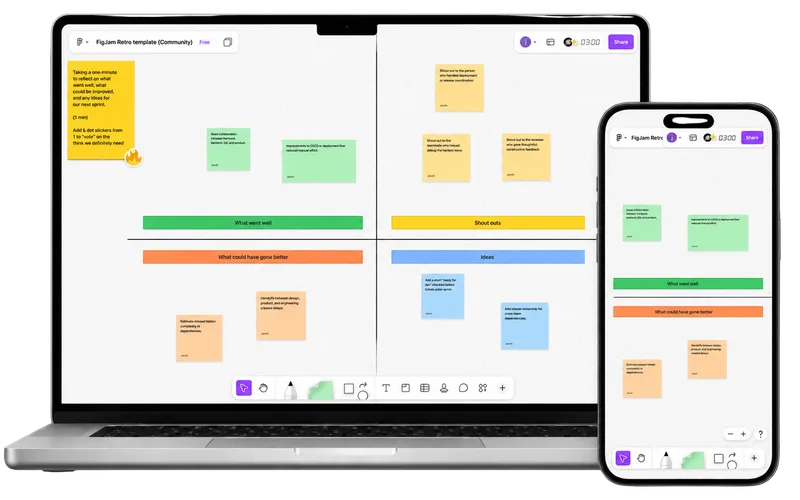
FigJam retrospective board shown on desktop and mobile

How FigJam describes itself

FigJam pitches itself as a whiteboard for thinking together — bundled inside the Figma platform for design and product teams who already collaborate there.

"FigJam is for everyone — brainstorm, plan and run a retro on the same platform you ship designs from."

The free Starter plan includes AI credits (150/day, 500/month), templates, voting, timer, audio and music — but caps a team at 3 FigJam boards. For unlimited boards, FigJam now sells a cheap Collab seat at $3/user/mo (annual) that grants full whiteboard editing with view-only Figma Design access — so facilitators no longer need a $16 full editor seat. Org/Enterprise tiers layer on SSO, SCIM, audit logs and admin controls. The buyer narrative is "Figma is already your platform — why pay for a second whiteboard?"

Our take

FigJam is the most fun retro venue in this list. Audio chats, music, stamp stickers and expressive cursors do a lot of work for engagement, the AI sort-and-summarise is genuinely useful (it'll cluster stickies by theme and even draft an action-item summary), and the $3 Collab seat makes the unlimited-board tier cheap to stand up. For design-led product teams already inside Figma, it's a no-brainer.

The honest gaps are predictable for a whiteboard: no tracked action items, no recurring retros, no health checks, no cross-team reporting. The AI summary writes action items as a text block — you can't assign owners or carry them to the next sprint. Anonymous input is weak: you can hide votes but not contributors. And the free Starter tier now caps a team at three FigJam boards, so any recurring retro practice hits a paywall fast. Best fit if Figma is already your home base. If it isn't, a dedicated retro tool will give you more retro-native structure — owners, due dates, carryover — for similar money.

Score breakdown

Ease of Use7.0
Retro Toolkit4.5
Value7.0
Fun Factor9.0
AI & Insights5.0
Integrations6.0
Enterprise-grade9.5

Pros

  • + Cheap $3/user/mo Collab seat unlocks unlimited boards without a full Figma editor seat
  • + Free tier includes real AI credits (150/day, 500/month) and the full retro toolkit
  • + Same login and platform as Figma — zero friction for design-led teams
  • + Playful, engaging UX (audio, music, stamps, expressive cursors) lifts retro fun factor
  • + Strong enterprise posture inherited from Figma: SAML, SCIM, SOC 2, ISO 27001

Cons

  • No native action-item tracking, recurring retros or health checks
  • Anonymous mode is weak — no built-in 'private until reveal' equivalent
  • No Microsoft Teams or Azure DevOps integration
  • Free Starter caps teams at 3 FigJam boards — a recurring retro practice outgrows it fast
  • Built primarily for designers; agile coaches sometimes find the canvas paradigm fiddly for structured retros

Features

Retrospectives

Templates· Hundreds of community retro templatesCustom templatesPrivate/public retros· Private files on paid teams

Facilitation

Meeting timerPresentation modeScreen-share mode@mentionsDrag-and-drop groupingAsync modeWhiteboard

Voting

Independent dot votingCustom vote count

Engagement

Mobile friendly· iOS app; full editing best on desktopPollingIcebreakersGIFsMusicCustom backgroundsPlanning poker· Via community widgetsTeam kudos· Via stamp/sticker reactions

AI

AI grouping / clusteringAI template suggestionsAI action items· AI summarises selected stickies into an action-item text block; no tracked action recordsAI summary

Reporting

Facilitator meeting notes

Enterprise

SSO / SAML· SAML SSO on Organization and EnterpriseSCIM provisioning· SCIM on Organization and EnterpriseSOC 2 Type 2GDPR compliantAudit logs· Enterprise tierGuest / observer rolesMeeting history· Files persist with version historyEmail domain restrictions· Enterprise tierUptime SLA / dedicated support· Enterprise tierMulti-year contractsISO 27001 certifiedPublic APIWebhooksData residency· United States (Enterprise tier only)

Integrations

JiraLinearGitHubAsanaMonday.com· Make connector + community widgetSlackConfluenceNotion· Make connector + community widget

Compare FigJam against