
Retrospective Tools
Neatro logo
Retrospectives· Quebec, Canada· Founded 2020

Neatro

Structured retros built around psychological safety

Overall score
5.5

Overview

Neatro runs retrospectives through a guided four-step framework with optional per-comment anonymity, AI grouping suggestions, an automatic ROTI survey, and Team Radar health checks aimed at distributed agile teams.

Best for: Scrum Masters who want a guided, safety-first facilitation flow with built-in team health tracking.
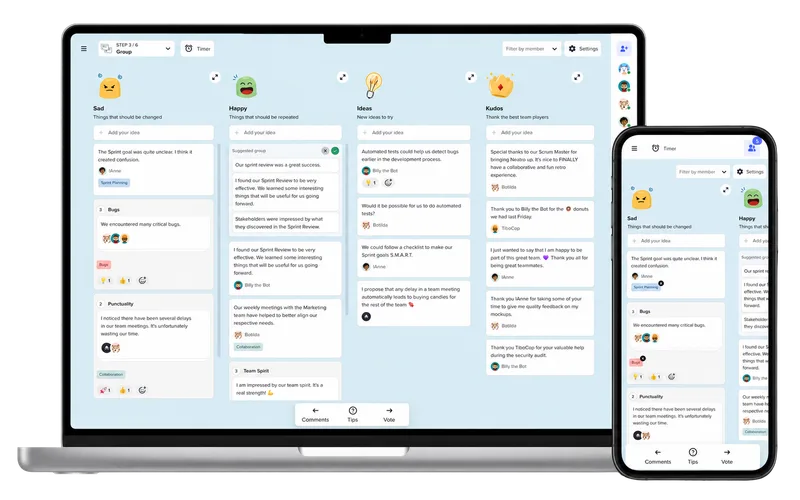
Neatro retrospective board shown on desktop and mobile

How Neatro describes itself

Neatro pitches itself as the place "where modern teams grow" — a calm, structured retrospective platform for distributed agile teams that puts psychological safety ahead of feature volume. The pitch rests on a four-step framework (Comments, Group, Vote, Action Plan) where nobody sees anyone else's comments until the facilitator reveals them, optional anonymity, an automatic ROTI survey and a community template gallery, Neatroverse.

"With Neatro, foster psychological safety and cultivate continuous improvement."

Logos include Adobe, L'Oréal, Capgemini, Goodyear and Snyk against a claimed 80,000+ users. The template count depends on the page: 30 on the templates catalogue and enterprise page, 70 on pricing. The marketing site never mentions AI; the grouping assistant appears only in the app and help centre.

Our take

Neatro takes facilitation craft more seriously than most. Comments stay hidden until the facilitator reveals them, anonymity can be optional or enforced, and an automatic ROTI survey closes every session. Team Radar is a credible recurring health check with up to 10 custom dimensions. Follow-through is the quiet strength: actions link back to the comments behind them, live on a Kanban board and resurface at the start of the next retro. AI is limited to grouping suggestions the facilitator accepts or rejects one at a time: no summaries or sentiment, but the right amount of automation for a live room.

The gaps are specific. Integrations are one-way action-item pushes to six trackers (Jira, Azure DevOps, GitHub, Asana, monday.com, iceScrum), no Slack or Teams, and the free plan has no exports, integrations or AI. Neatro has no SOC 2 or ISO 27001 of its own, Quebec City-only hosting, and no SCIM, audit log, public API or cross-team rollup.

Right for Scrum Masters who want retro quality over feature count; wrong for enterprises needing program-level reporting or a compliance attestation.

Score breakdown

Ease of Use9.0
Retro Toolkit7.5
Value8.0
Fun Factor6.5
AI & Insights2.0
Integrations5.0
Open Platform1.5
Enterprise-grade4.5

Pros

  • + Guided four-step framework with optional anonymous commenting and a timer on every step
  • + Team Radar is a proper recurring health check with up to 10 custom dimensions, not a repurposed template
  • + AI grouping suggestions at Step 2 that the facilitator accepts or rejects one at a time — assistive, not automatic
  • + Action Kanban board, an automatic ROTI survey and a prompt about last retro's open actions keep follow-through visible
  • + Cheap per head — $23.20/team/mo covers unlimited members, and the free tier runs 10 members forever

Cons

  • − No native Slack or Microsoft Teams integration — reminders and summaries land wherever you paste the link
  • − AI stops at grouping suggestions; no summaries, sentiment analysis, or AI-extracted action items
  • − Free tier has no exports, integrations, guest links or AI grouping — all start at Premium
  • − Per-team pricing gets awkward past a handful of squads — volume discounts only start at 20+ teams
  • − No SOC 2 or ISO 27001 of its own (the security FAQ points at Azure's), Quebec-only hosting, and no SCIM, audit logs, public API or cross-team rollups

Features

Retrospectives

TemplatesCustom templatesAnonymous inputPrivate brainstorm (hide until reveal)Schedule future retros· Schedule retro button picks the date of the next session; the facilitator gets a reminder email with the join link one day before. No recurrence, no calendar invite

Health checks

Health checksCustom health-check modelsTeam radarsPsychological safety

Facilitation

Meeting timerAction itemsLink actions to ideasDrag-and-drop groupingCarry over open actionsFacilitator-only grouping· Group Options lets the facilitator change who may group comments (all participants by default)Async mode· Async comment collection — the facilitator leaves the board open on Step 1 so the team posts across the sprint; grouping, voting and the action plan are live

Voting

Independent dot votingCustom vote count

Engagement

Mobile friendlyROTI feedbackIcebreakersGIFsEmoji reactionsCustom backgrounds

AI

AI grouping / clustering· Premium tier and up. AI suggests groups of similar comments when the facilitator reveals Step 1; each suggestion is accepted or rejected. Within one column by default, optionally across columns; admins can switch AI off per organization or team

Reporting

Action tracker dashboardAction kanban boardExport formats· PDF, CSV, Jira

Enterprise

SSO / SAML· Pro tier and up (SAML — Azure, Okta or any custom IdP); Google and Microsoft/Office 365 sign-in on all tiersFacilitator-only roleGuest / observer roles· Guest links (join without an account, no access to team history) on Premium and upMeeting historyEmail domain restrictions· Pro tier, on requestUptime SLA / dedicated support· Enterprise tier (99.9% uptime SLA, dedicated CSM); guaranteed support response 48 business hours on Premium, 24 on Pro and Enterprise, none on FreeData residency· Canada (Canada-only (Quebec, Azure))Languages· 2 (English, French)

Integrations

Jira· Push action items to Jira Cloud as issues (one-way); Premium tier and upAzure DevOps· Push action items to Azure DevOps as work items (one-way); Premium tier and upGitHub· Push action items to GitHub as issues (one-way); Premium tier and upAsana· Push action items to Asana as tasks (one-way); Premium tier and upMonday.com· Push action items to monday.com as items (one-way); Premium tier and up

Compare Neatro against