
Retrospective Tools
Mural logo
Whiteboard· San Francisco, US· Founded 2011

Mural

Visual collaboration whiteboard with a mature facilitation toolkit and AI-assisted sessions

Overall score
6.6

Overview

Mural is a long-established visual collaboration platform — an infinite canvas with sticky notes, anonymous voting, timers, Private Mode, 250+ workshop templates (eight of them retro-specific), Mural AI (cluster, summarise, mind-map, Classify by emotional tone), and a Facilitation Superpowers toolkit (Outline, Timer, Voting, Private Mode, Summon, Celebrate) refined for over a decade. Best-in-class enterprise posture: SSO/SAML with multi-IdP support, SCIM, BYOK, SOC 2 Type 2, ISO 27001 and ISO 42001, GDPR and US/EU/Australia data residency.

Best for: Workshop-heavy teams (design, product, agile coaching) that want a polished facilitation canvas with strong retro templates and enterprise-grade controls.
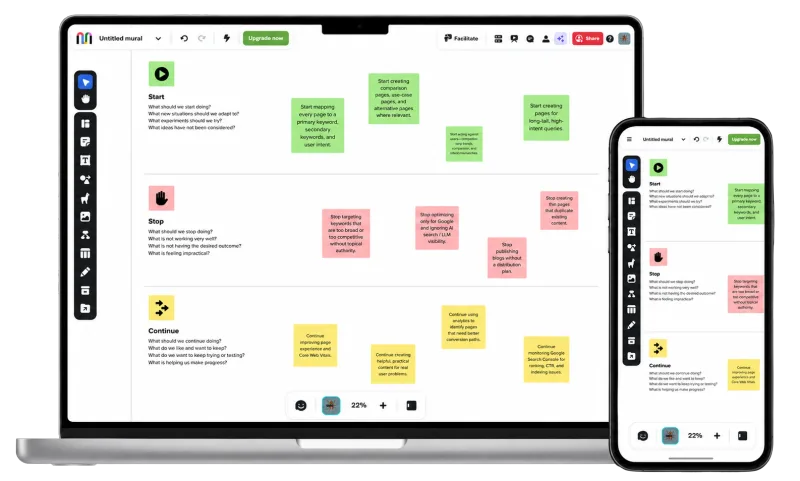
Mural retrospective board shown on desktop and mobile

How Mural describes itself

Mural sells facilitation craft first and AI second: an infinite canvas for workshops, retros, design sprints and brainstorms, wrapped in trademarked Facilitation Superpowers® — Timer, anonymous Voting, Private Mode, Summon, Celebrate, Outline. The retro page is unusually plain-spoken about the job it does.

"The online retrospective tool for better agile teamwork."

The target buyer is the workshop-led team — design, product, agile coaching — that also has to clear a procurement review. Mural AI is pitched as five named moves (Mind Mapping, Clustering, Understanding, Classify, Converse) rather than a chatbot, invoked since July 2026 through guided workflows instead of a blank prompt box. Free keeps your three most recent murals editable; AI starts at Team+ ($9.99/user/mo annual), SSO at Business ($17.99).

Our take

Mural is still the most polished facilitation canvas on the market, and enough of that polish is genuinely retro-relevant: votes are anonymous by default, Private Mode hides everyone's stickies until the facilitator ends it (authors can stay hidden after the reveal), Outline turns a sprawling board into a walkable agenda, and work-item cards for Jira, Azure DevOps and, since September 2026, Linear and GitHub let an action leave the retro as a tracked ticket. Enterprise posture is first-class: SOC 2 Type 2, ISO 27001, SCIM, audit logs, BYOK, data-classification labels and US/EU/Australia residency.

The gaps are structural, not incidental. No health checks, no recurring retros, no action carryover, no cross-team rollup — eight named retro templates, and anything past them you rebuild each sprint. The AI clusters, summarises and tags sentiment within one board and remembers nothing across sprints. There are no webhooks, and the MCP server is a public preview that needs the mural open in a browser tab.

Buy Mural for the workshop and run your retros in it. Don't buy it for the retros.

Score breakdown

Ease of Use7.0
Retro Toolkit5.0
Value5.0
Fun Factor6.5
AI & Insights5.5
Integrations8.0
Open Platform6.0
Enterprise-grade9.5

Pros

  • + Mature facilitation toolkit — Outline, Timer, Voting, Private Mode, Summon, Celebrate — refined over 10+ years
  • + Anonymous where it counts: votes hide who voted, and Private Mode can keep sticky authors hidden even after reveal
  • + Best-in-class enterprise posture: SOC 2 Type 2, ISO 27001 and 42001, GDPR, SSO/SAML (multi-IdP), SCIM, BYOK, US/EU/Australia residency
  • + Two-way work-item cards for Jira and Azure DevOps and, since September 2026, Linear issues and GitHub pull requests, all editable inside the mural
  • + Five export formats (PDF, PNG, PPT, HTML bundle, CSV of stickies) — unusually broad for a canvas tool

Cons

  • − Per-seat pricing: a 24-person org pays ~$240/mo on the Team+ tier (annual), well above retro-native tools at that headcount
  • − No health checks, mood tracking, recurring retros, action carryover or cross-team rollup — facilitators rebuild structure each sprint
  • − AI (clustering, summary, sentiment Classify) helps inside a session but doesn't track trends across retros
  • − SSO/SAML needs the $17.99/user/mo Business tier; SCIM, audit logs and data residency are Enterprise-only
  • − The public API is still labelled beta and has no webhooks, and the MCP server is a public preview that needs the mural open in a browser tab

Features

Retrospectives

TemplatesCustom templatesAnonymous input· Votes are anonymous by default; Private Mode can keep sticky authors hidden after revealPrivate brainstorm (hide until reveal)Private/public retros· Private murals on Team+

Facilitation

Meeting timerAction items· Sticky notes convert to Jira, Azure DevOps, Linear, GitHub or Asana work items; no native action trackerPresentation modeScreen-share modeAgenda planner· Outline on every plan, with hide-and-reveal sections@mentionsComments on cardsDrag-and-drop groupingAsync modeWhiteboard

Voting

Independent dot votingCustom vote count

Engagement

Mobile friendly· iOS/Android apps; canvas editing is cramped on phonesPolling· Built-in voting, no separate poll widgetIcebreakersGIFsEmoji reactionsCustom backgroundsPlanning poker· Via templates, not a native module

AI

AI grouping / clusteringAI summaryAI sentiment / heatmaps· Mural AI Classify sorts stickies by emotional tone; no longitudinal trackingIn-meeting AI assistant· Mural AI chat creates and edits board content, but only inside a guided AI workflow (ideas, mind maps, flowcharts) since the July 2026 redesign

Reporting

Facilitator meeting notesExport formats· Image, PDF, PowerPoint, HTML, CSV

Enterprise

SSO / SAML· SAML 2.0 on Business+; multiple IdP connections across email domains on Enterprise (Aug 2026)SCIM provisioning· Enterprise tier onlySOC 2 Type 2GDPR compliantAudit logs· Enterprise tierFacilitator-only roleGuest / observer roles· Unlimited visitors on every planMeeting history· Murals persist; no dedicated meeting-history viewEmail domain restrictions· Enterprise tierUptime SLA / dedicated support· Enterprise tierMulti-year contractsISO 27001 certifiedPublic API· REST API with full reference docs, but labelled beta by Mural ('not generally available', provided as-is)MCP server· Public preview on paid plans (on by default for Team+ and Business, Enterprise admins must enable it); the mural must stay open in a browser tabData residency· United States, European Union, Australia (Enterprise tier only; set per workspace by Mural Support (EU: Frankfurt; AU: New South Wales). Mural AI requests from AU workspaces are processed in the US)Languages· 9 (English, Spanish, German, French, Japanese, +4 more)

Integrations

Jira· Two-way sync via interactive work-item cards with configurable/custom fields and in-mural editing; Business+Linear· Two-way sync: import issues, create them from sticky notes, sync edits both ways (Sep 2026)Azure DevOps· Two-way sync via interactive work-item cards with configurable/custom fields and in-mural editing; Business+GitHub· Create issues from sticky notes, plus pull-request cards with two-way field sync (Sep 2026); Business+Trello· Via Zapier (stickies to Trello cards) or Smart Link previews; not nativeAsana· Two-way syncSlackMicrosoft TeamsConfluenceNotion· Embed/Zapier only — not native

Compare Mural against